Know what your agents
did on every call.
Call volume, outcomes and sentiment in one view. A transcript and a summary for every conversation. And when something sounds wrong, listen to the call while it is still happening.
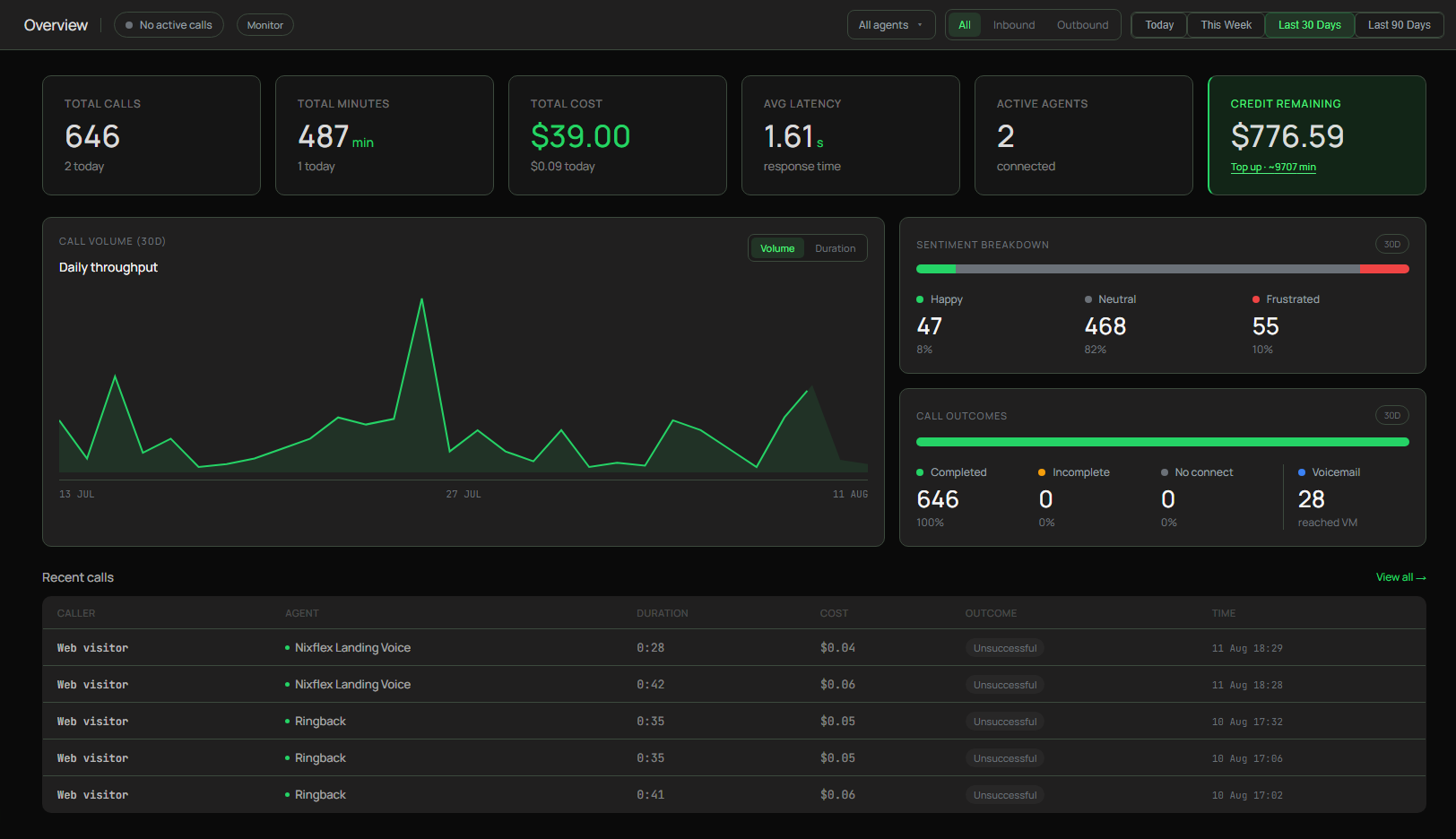
Monitoring a voice agent means watching two things: the shape of your traffic, which is call volume, outcomes and sentiment across every call, and the individual conversations behind it, which each return a transcript and a summary. Nixflex shows both in one dashboard and lets you listen to a call in real time while it runs.
THE ROUTINE
How do you keep an eye on live agents?
Watch the shape of the traffic
Volume over the last thirty days tells you whether something changed, and the outcome split tells you whether the calls that arrived actually finished. A dip in completions is visible long before anyone complains.
Open the calls that look wrong
Every call carries a transcript, a summary and a sentiment score, so you read what happened rather than replaying audio hunting for the moment it went sideways.
Listen while it is still happening
When something is going wrong right now, Live Monitor lets you hear the call in progress from a phone or tablet. Tone and pacing problems never show up properly in text.
WHAT TO WATCH
The signals that matter, and what they mean
| Signal | What it tells you | Where it lives |
|---|---|---|
Completion rate | Whether calls are finishing the job rather than falling apart | Call outcomes |
Sentiment split | Whether callers are leaving satisfied, even on calls that technically succeeded | Sentiment breakdown |
Voicemail rate | How much outbound spend is landing on machines rather than people | Call outcomes |
Average duration | A sudden climb usually means the agent is going round in circles | Call volume, duration view |
Response time | How quickly your agent is answering, tracked on your own traffic | Overview |
Check the outcome split after every prompt change. It is the fastest way to notice that an edit which read perfectly well has quietly broken a flow.
WHAT YOU CAN SEE
What is actually in front of you?
Listening to a call as it happens
Live Monitor plays a call in progress on your phone or tablet. It exists because Nixflex runs its own engine and can tap the audio, which platforms built on someone else infrastructure cannot easily do. It is the fastest way to catch a tone problem that a transcript makes look fine.
A written record of every conversation
Transcript, summary, sentiment, outcome, duration and cost come back from each call, plus any custom fields you asked the agent to extract. You can answer what happened on that call without listening to a single second of audio.
Thirty days at a glance
Volume and duration trends show change before anyone reports it.
Sentiment, not guesswork
Happy, neutral and frustrated split across all your calls.
Cost per call, visible
Spend sits next to the calls that produced it, not in a bill later.
Straight into your stack
Webhooks and the calls endpoint feed your own dashboards.
WHERE THIS STOPS
Operational visibility, not an evaluation platform.
Nixflex will show you what happened on every call and let you hear one as it runs. It does not score conversations against custom rubrics, trace every turn as spans, or page you when a percentile drifts. A category of dedicated voice observability tools does that properly, and once an agent handles money or health it is worth having. For everything up to that point, the dashboard plus a webhook into your own systems is usually the whole answer.
QUESTIONS
Monitoring, answered
How do I monitor a voice AI agent in production?+
Start with the shape of your traffic. The dashboard shows call volume over time, the outcome split across completed, incomplete, unconnected and voicemail, and a sentiment breakdown across every call. From there you open individual calls to read transcripts and summaries, and you can listen to a call while it is still running.
What does Live Monitor do?+
It lets you listen to an AI call in real time from a phone or tablet while the conversation is happening. This is possible because Nixflex runs its own voice engine and can tap the audio directly, which closed platforms cannot easily offer. Numbers with it enabled bill inbound minutes at $0.09.
What data comes back from every call?+
A transcript, an automatic summary, a sentiment score, the outcome, the duration and the cost. You can also extract custom fields defined for your use case, so a call can report structured facts such as whether a booking was made rather than just leaving you a wall of text.
Can I pull the data into my own tools?+
Yes, two ways. Webhooks push each call to your server as it happens, and GET /v1/calls lets you read history whenever you want. Teams commonly send the same events to their own product and to a workflow tool so the data lands where the team already works.
Does Nixflex do span tracing, evals and alerting?+
No. There is no evaluation engine, no per-turn trace tree and no SLO alerting here, and pretending otherwise would waste your time. Dedicated voice observability platforms exist for that depth. What Nixflex gives you is the operational view: what happened on every call, what the outcome was, and the ability to listen in live.
What should I actually watch week to week?+
Completion rate first, because it is the closest thing to whether the agent is doing its job. Then voicemail rate on outbound, sentiment drift after any prompt change, and average duration, since a call that suddenly gets longer usually means the agent is going in circles.
How far back does the call history go?+
Call records and transcripts are retained according to the data retention policy, and you can read them over the API at any point. If you need them long term, the reliable pattern is to store what matters in your own database as the webhook arrives.
Does monitoring cost extra?+
The dashboard, transcripts, summaries and sentiment are included in the flat $0.08 per minute. The one exception is Live Monitor, where numbers with it enabled bill inbound minutes at $0.09.
See your calls, not just your bill.
Volume, outcomes, sentiment and a transcript for every conversation, from the first call.
Last updated August 2026